Friday, 29 May 2020

Organizing Your Bookmarks

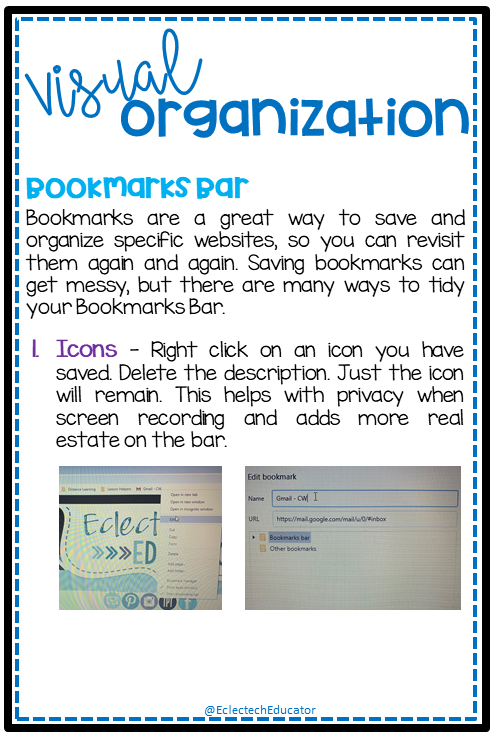
Visual Organization

I have included some tips for organizing your browser to help you find frequently visited sites quickly , obtain more space on your Bookmarks Bar, and to hide sites you may not want students to see when screen recording. Do students really need to see my Amazon order or that I bookmarked a wine lover site?


Wednesday, 13 May 2020

Boom Cards

Boom is a platform that allows teachers to purchase and/or create digital activities for students. Boom “decks” are made up of individual, digital task cards that are gamified for students to complete.

Why Use?

  • Differentiating your instruction (you can assign different students different decks!) 
  • Giving students immediate, automatic feedback 
  • Getting students EXCITED about learning with badges and fun digital “rewards” for their work
  • Holding students accountable for their independent work Saving time (less grading!) 
  • Saving paper

What Do I Need?

  • A computer, tablet, or interactive whiteboard 
  • A free or paid Boom account 
  • An internet connection to access the Boom decks

How can I use Boom cards that I purchase on TeachersPayTeachers? 

  • Purchase decks or bundles from a TeachersPayTeachers store. 
  • Once purchased, you will receive a PDF download. 
  • Open up the PDF. Inside the PDF, you will find links to a Boom deck. Click the link to add the deck to your Boom library. You will have to create or log into your Boom account. Once a link is clicked, it will ALWAYS remain in your Boom library for you to access!

How much does it cost to use Boom? 

  • You can use Boom for free. 
  • However, a paid account allows you to: get reports about student progress and activity, easily assign students multiple decks to work on, and create an entire classroom of student logins

If I only have a free account, how can I use Boom cards with my students? 

  • Once logged into your Boom teacher account, go to “Library,” find the deck you want students to use
  • Click on “FastPin” and select “Generate New Pin.” 
  •  You then have two options: Either: Copy and paste the complete link for students to play, OR Go to the Boom main page. Click on the “FastPlay” button. Enter the pin and click “play.” Important: A pin is valid for 5 days. After the 5 days are up, you can still access the cards, but you will need to generate a new pin for student use.


View the preview of my first Boom Deck entitled Nonfiction Text Features. The 39-deck has students practice the purpose and function of nonfiction text features, such as headings, charts, and timelines.


Tuesday, 14 April 2020

Distance Learning

Distance or remote learning is uncharted territory for most of us. We are planning and thinking about teaching in new ways.

To help you in this new journey, I have compiled tips and strategies to help make this process more effective for you, your students, and their caregivers.


Planning

  • Weekly Planner - This FREE resource provides a week at a glance. It can be used as a planner for teachers or uploaded to your digital classroom as an organizer for students. The text boxes are editable, so it can be customized to your needs.

Morning Meeting or Starting The Day

  • Flipgrid - Foster short video-based discussions on classroom topics. Great for Morning Meetings, as well as reading fluency, book talks, Socratic discussions, and check-ins.
  • Zoom - Engage students: chat, screen annotation, polling, non-verbal feedback, and breakout rooms. Use the features of Zoom to guide different types of interactive activities.
  • Google Meet - Meet is a replacement for Google Hangouts video chat. Using this video chat service to connect with classrooms across the globe. Connect with teachers, meet with parents, or have students meet together and with professional experts. 
  • Kahoot - Run checks for understanding or exit tickets. If you don't have time to make quizzes, search millions of public Kahoots to play or remix. Go beyond memorization of facts and allow Kahoot! to introduce scenario questions/prompts with multiple decisions; stimulate conversation from the results.
  • Screencastify - Create instructional videos to introduce or reinforce concepts. Alternatively, create videos to explain assignments and solutions or to provide feedback. Have students create videos to explain understandings, demonstrate fluency, or ask questions.

Reading

  • Epic! - Epic! is a digital library of children’s books. The site presents book choices to students. Students can browse by their interests or categories, and see eye-catching book covers. Epic! makes listening to and reading books incredibly appealing. There are book videos and quizzes, as well!
  • NewsELA - A library of high-interest, cross-curricular, adjustable nonfiction texts. Newsela's range of reading levels invites targeted intervention and differentiation. Assign articles to individual students or small groups, using the quizzes to track progress and make further recommendations. Select articles for targeted instruction on specific reading outcomes while modeling good annotation and close-reading strategies for your students.
  • ReadWorks - Differentiate reading instruction with texts. Features, such as the ability to curate lists and view assignments over time, make it easy to monitor student progress.
  • Dreamscape - Combines games with reading passages and interactive questions to create engaging activities!
  • Google Forms - Create surveys, ask questions, administer quizzes, or use as a method for submitting work. Teachers have the opportunity to track an abundance of information and store it in one centralized location. 

Math

  • Khan Academy -  The instructional videos help students learn new content, and the interactive quizzes help teachers track student progress, Khan Academy offers help in many subjects like math, science, economics, art, and computer science, as well as resources for test prep and teacher learning.
  • Prodigy - Have students practice their math skills as they navigate a fantasy world. Built to captivate students and motivate learning, Prodigy has students practice math skills  through assigned and customized assignments.
  • Math Presentations - I have created many presentations to help guide students learning in several mathematical topics: 


I hope that these tips help you navigate this new territory of home learning. If you have any additional tips or suggestions, please post in the comments. We are all in this together!


Monday, 9 March 2020

St. Patrick's Day

On March 17th, people of Irish heritage celebrate St. Patrick’s Day with parades, wearing green, and avoiding being "pinched." Students love to hear tales of cunning leprechauns and fairies and their partaking in mischief.

So put on your green, stick a shamrock in your hair, and head on down to the end of the rainbow with this very lucky St. Patrick's Day post ! Complete with themed math centers, fun writing prompts, reading passages, craft ideas, and graphing ideas, I have shared my favourite St. Patrick’s Day activities for primary students.


Leprechaun Letters

Build excitement by leaving leprechaun "evidence" in the room before the students arrive. Mess up books, toys, papers, books, backpacks, etc. Leave glitter behind and footprints.  Leprechaun footprints can be made by stamping the side of your fist in green paint! 

Three days prior, read a letter each day left by the leprechaun and search for the leprechaun’s shoes, pot of gold, green treats, etc. that had been left behind.  See the letters in my St. Patrick's Day Activities resource! As St. Patrick's Day draws near, make the messes bigger!


St. Patrick's Day Literacy

A favourite read aloud is  Jamie O’Rourke and the Big Potato. The tale features a lazy man who is sure he'll starve to death after his wife becomes ill. A wily leprechaun intervenes, and one wish later, the man is the proud owner of a potato as big as a house! The story lends itself to making predictions and foreshadowing. 

Fiona’s Luck is another favorite St. Patrick’s Day read aloud.  An original folktale full of wit, magic, and leprechauns, that is sure to delight for St. Patrick’s Day as well as all year round. The luck of the Irish has waned after the greedy Leprechaun King has taken all the good fortune in Ireland and locked it away. It is up to one cunning girl, Fiona to come up with a plan to get the luck and good tidings back from the leprechauns to help the people of Ireland. Through clever charades, Fiona uses her wit to outsmart the powerful Leprechaun King and restore luck to the Emerald Isle. This folktale is perfect for introducing or reviewing theme as students learn that cleverness and intelligence is  advantageous.

Will your students be the first to catch a leprechaun? Catching leprechauns is no easy task!  An included reading passage shows students need need more than dandelion tea and four-leaf clovers! Pair the reading passage with the picture book How To Build A Leprechaun Trap - which shows builders need the perfect trap with precise calculations and proper engineering.

The reading passage and printables that accompany these book are included in my St. Patrick's Day Activities resource!


St. Patrick's Day Mathematics

St. Patrick's Day is a great time for students to practice their data management skills. The Irish are infamous for the many delicious ways they prepare potatoes, from pancakes to Irish candy style! Potato Graph Poll students to determine how they like their spuds: baked, mashed, tater tots, French fries, hash browns, or potato chips. Have students create a pictograph of their favourites.  The activity is included in my St. Patrick's Day Activities resource!


Lucky Charms cereal is perfect for St. Patrick' Day. In March, General Mills often features green boxes of Lucky Charms in stores which include a special, limited-edition marshmallow blend of pots of gold, green shamrocks and new gold coins.  Provide each student a handful of the cereal (regular or green box) and have them graph their results. The graph is included in my St. Patrick's Day Activities resource!


St. Patrick's Day Writing

Limericks are a type of nonsense poetry that are intended to be silly and fun. Limericks originated in England in the early 18th century. Legend has it that the name of the poetry originates from Ireland, which is why limericks are so popular during St. Patrick's Day.

Limericks depend on rhythm and rhyme. Lines one, two and five rhyme with each other. Lines three and four rhyme with each other (AABBA).

Share several limericks from Edward Lear's The Complete Book of Nonsense. Have students compose limericks. The limerick templates and exemplars are included in my St. Patrick's Day Activities resource!


As you can see, I always sneak many activities to celebrate St. Patrick's Day! I hope your students enjoy the activities.


Friday, 21 February 2020

Fiction vs Nonfiction

Readers approach fiction and nonfiction differently. Fiction refers to plot, settings, and characters created from the imagination, while nonfiction refers to factual stories focused on actual events and people. 

 The contents of the Fiction vs. Nonfiction Interactive Notebook:

  • Bibliography 
  • Anchor charts 
  • Elements Interactive Notebook
  • Book Sort Interactive Notebook
  • Text Sort Interactive Notebook
  • Genre Sort Interactive Notebook
  • Summary Interactive Notebook
  • Writing Activity


Thursday, 13 February 2020

Reading and Interactive Notebooks

I have been thinking a lot about how structure my literacy block, particularly Readers' Workshop. I wanted to share the Reading Rotation and interactive notebooks that we use to keep track of our skills and strategies.

Minds-On

We start together with a Minds-On block. This block is a time for students to notice the author’s craft and to engender comprehension strategies.  . This can be an explicit modelling of the skill, modelled reading, shared reading, or an interactive reading of a mentor text. This block readies our minds to learn or develop a literacy skill.

Reading 

Next, we read! In the Reading block, each student or pair of students have an individual novel with aligns to the mode of reading we are currently studying, such as biographies or persuasive texts. It is time for students to note their reading progress and to read for a sustained period of time. As they read, students are encouraged to take notice of the literacy skills we studied in the Minds-On session.

Independent Task

Now we move into Independent Task block, students practice the skill by completing a task in the Reading Rotation. This block is a time for students to share and coalesce their thinking with a partner or small group. Students engage in reflective dialogue regarding their reading and comprehension of read texts.

Interactive Notebooks

I have created many interactive notebook resources to help students Examine the text. Please visit my store to see my Theme and Author's Purpose 


Reflect

The Reflect block of the reading block is a time for students to voice their new learnings and to revisit the teaching point. Students voice the “Noticings” and “Wonderings” shared with their partner to the larger group. Students name the reading skill or strategy they noticed, and perhaps used, in their independent reading. Teachers take note of the sharing on a class chart. The anecdotal records serve as an assessment tool, as well as means for determining A revisitation of the teaching point brings closure to the session